
For clients
Benefits for tennis school clients
The system allows multiple players to be managed under a single account. Each player can have separate training sessions, billing models, and assigned discounts. The system generates detailed reports, itemizing charges for court rentals, individual lessons, and participation in tennis training programs.
Class schedule
Ability to view the training schedule of all players assigned to the account.
Billing monitoring
Access to detailed reports and account balance.
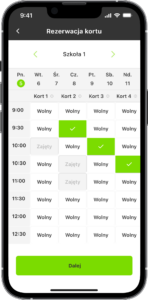
Court booking and payments
Court bookings and payment processing.
Absence reporting
The client can report a player’s absence from a session or cancel a court reservation within a specified time frame, which may result in a refund according to the school’s policy.
Enrollment in makeup sessions
Option to choose the number of sessions per week, group size, and skill level.
Setting preferences for group classes
Selecting the number of weekly sessions, group size, and skill level.
Tennis school billing with clients
A flexible payment model allows clients to choose the most convenient billing method, while giving the school full control over payments, overdue balances, and class registrations.
- The system supports billing for recurring classes, such as semester-based tennis courses for children.
- The school can set a price for the entire training cycle, for example from February to June.
- The client can pay for the full cycle upfront and receive a discount if the payment is made by a specified deadline.
- Discounts are configurable, for example 5% or 10% for paying the full semester in advance.
- If the client does not pay the full amount by the deadline, the system can automatically switch them to a monthly payment model.
- In the monthly model, the total course fee is divided into installments, paid at the beginning of each month.
- The system reminds clients about payments through in-app notifications.
- The school owner can see information about overdue payments and a list of clients with unpaid balances.
- In the case of overdue payments, the system can restrict the client’s ability to sign up for additional classes.
- Payments can be made online, for example by card, bank transfer, or BLIK.
- The administrator can also manually mark a cash payment if the client pays directly at the school.
- For single training sessions, billing is simpler — the client pays for a specific service, either online or on-site.
- The system supports different types of classes, such as individual, group, and two-person lessons.
Mobile app for clients
The user account is a central element of interaction with the system. Each account must have at least one player assigned to it. Example scenarios for using an account include:

Court rental
Clients use the account solely to book courts and pay for them in advance.

Individual or pair lessons
Clients schedule one-on-one or two-person sessions with an instructor.

Easy and transparent billing
The system automatically records all payments and transactions, ensuring full cost transparency for clients.

Group classes for children/adults
Client add another player to the account, such as a child participating in group tennis school sessions.

“TenniSphere is the best software for managing a tennis academy”
It is a system that simplifies daily operations, eliminates chaos, and allows you to focus on what matters most — training children and players, and developing a passion for tennis.
I highly recommend it,
Magdalena Grzybowska
Check out TenniSphere in action!
Fill out the form and try the demo to see how TenniSphere can streamline your tennis academy!